


NickWatch: Parent App
3.249.00 Reviews
App Specs
- Version
- 1.1.15
- Updated On
- License
- Free
- Downloads
- 100,000+
- Developer
- Watchinu by Trackimo
- Categories
- Parenting
- Platform
- Android
Screenshots
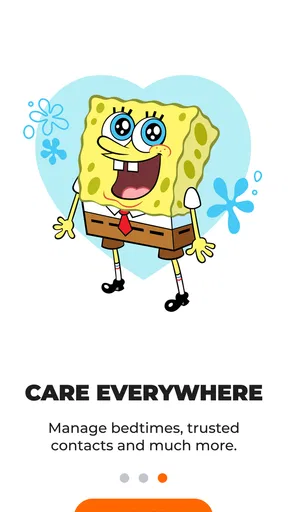
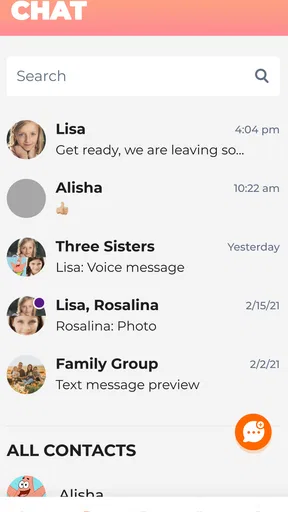
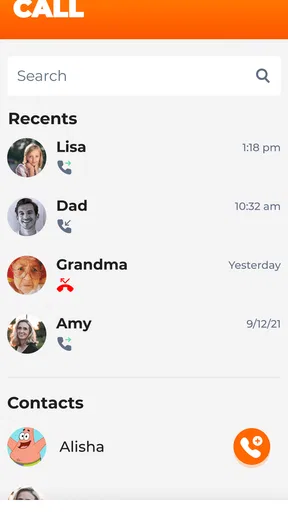
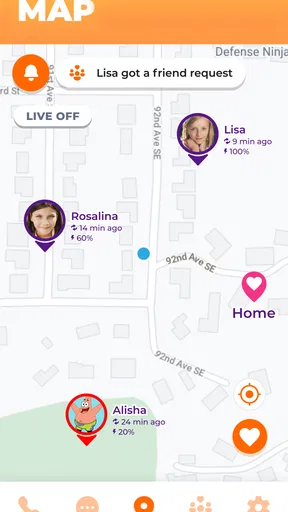
 Analysis by AppCompare
When a child starts travelling a familiar route without an adult, I understand the appeal of having a parent app that works alongside a child’s wearable. The useful question is not simply whether it can show a location, but whether its controls are clear enough to use calmly and whether the family is comfortable relying on a connected watch. That balance is what I would consider before choosing NickWatch: Parent App.
Readability and navigation in a parent’s routine
NickWatch: Parent App is a parenting app from Watchinu by Trackimo, made to activate and manage NickWatch features. Its purpose is tied to the wearable, so it is not a general-purpose family organiser or a standalone way to follow a child who does not use NickWatch. I would treat the parent app and watch as a paired setup, not as two interchangeable products.
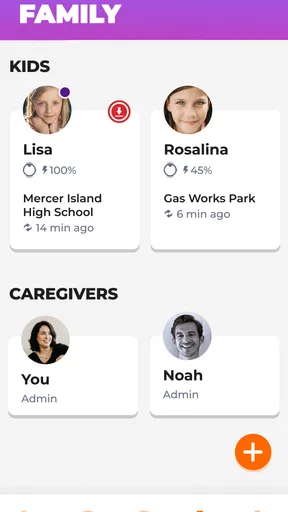
In a busy moment, a parent needs to recognise the important control without hunting through menus. The original interface is described as logically arranged, with an intuitive design and self-explanatory icons. That sounds promising for routine checks, but I would still take a few quiet minutes to learn where the settings and alerts are before depending on them during a school run or while coordinating a pickup. Familiarity matters more than speed when a notification arrives unexpectedly.
It is also worth thinking about who in the family may need to use the app. One parent might handle setup, while another only checks in occasionally. Agreeing who manages settings and who responds to messages can prevent confusion, particularly if several adults share childcare. I would avoid making changes to zones or reminders in a hurry; a quick review together makes it easier to know what the watch is expected to do.
Motor and sensory considerations
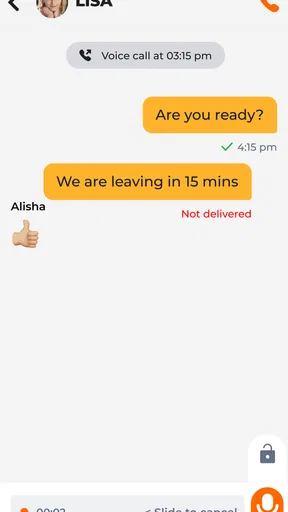
For someone who finds complex phone controls tiring, a clean layout and recognisable icons can reduce the effort of everyday use. Messaging and reminders may also offer a more structured way to coordinate with a child than repeated calls. Still, a parent should test the app personally rather than assume that a simple-looking screen will suit every hand, eyesight, or reading preference. The practical test is whether the person who will use it can locate the needed control without strain.
There is another side to accessibility: the child’s experience of the wearable. The app can manage NickWatch features, while the watch is the child-facing device. If a child is sensitive to alerts, prefers fewer interruptions, or needs instructions delivered in a particular way, it is sensible to discuss the routine before relying on reminders and messages. A feature only helps when its timing and presentation work for the child as well as the adult.
The product is listed for Everyone, but that age label does not settle whether its interaction style fits a particular family member. I would focus on a short practical trial: can the parent find a setting, understand an alert, and send a clear message without needing someone else to interpret the screen? That tells you more about personal suitability than a broad age designation.
Worth Reading Before You Choose

EA SPORTS FC Mobile 26 Is a Bigger Football Game, but It Takes Time

Flipboard Shows What News Apps Must Do Beyond the Feed

Switching to Android Auto Means Rethinking Your Driving Routine

Google Calendar Makes a Crowded Week Easier to Manage

Ludo King Makes the Most of the Minutes Between Plans

Baby Panda World Brings Quick Play to Modern Phones, but Its Game Library Feels Busy
Situational access: school, errands, and handovers
NickWatch’s combination of location checking, safe zones, messaging, and reminders is most useful when a family has a predictable routine. For example, a parent might want to check that a child has reached a familiar place after walking with a trusted adult, or send a quick note when pickup plans change. The app can support that kind of coordination, but it should not replace an agreed plan about where the child is going and which adult is responsible.
For a shared-care arrangement, the most helpful habit is to settle the practical details in advance: who checks the app, who receives or acts on an alert, and how the child should respond to a message. This avoids treating a location screen as a substitute for communication between adults. It also gives the child a straightforward expectation, rather than making them responsible for interpreting a string of changing instructions.
Location tools have limits in real life, even when an app feels responsive. A parent should treat a displayed position as useful context, not as proof that a child is safe or that every movement will be interpreted correctly. If a child is indoors, travelling with others, or following a changed route, a direct message or call may be the better next step. I would not make an urgent safety decision from a map view alone.
Where it differs from other family options
Compared with a general family calendar or messaging app, NickWatch is centred on managing a child’s wearable and its connected features. That can suit parents who want the location, safe-zone alerts, and child-directed communication in one wearable-based arrangement. It is less suitable for a household that only needs shared schedules, or for families who prefer not to introduce a connected watch.
It also differs from relying on a child’s phone. A phone-based approach may fit older children who already carry one and can manage it responsibly, while a watch-focused setup may be more appealing when a parent wants a child-facing wearable instead. Neither approach is automatically better: the choice depends on the child’s age, routine, comfort with devices, and the family’s boundaries around monitoring.
A useful trade-off is that the parent app’s value depends on the companion watch. If you are considering it, decide first whether the wearable itself fits your child and your household rules; the app alone is not a replacement for it. The Android app is free, and it has an average rating of 3.1 from around 320 ratings, with over 100,000 installs. Those figures suggest it has reached families, but I would use them as context rather than as a verdict on whether its setup suits your needs.
Remaining barriers and a sensible trial
The clearest limitation is that this is a connected-device arrangement, not a universal solution for every child or parent. Families need to be comfortable with location monitoring, and the child should understand what is being checked and why. If your priority is less tracking and more independence, a shared meeting point and agreed check-in times may be a better fit. If you want a tool that works without the NickWatch wearable, this is not the right choice.
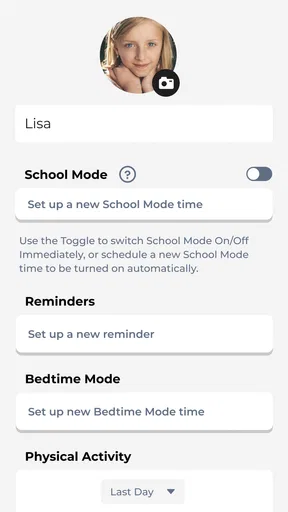
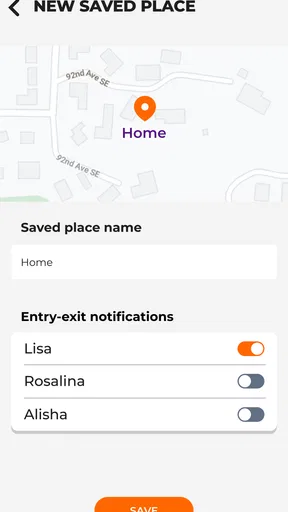
There is also a learning step that is easy to overlook. Before a busy day, I would set up the routine, identify the controls the family will actually use, and practise sending a simple message. If safe zones are part of the plan, decide what areas make sense for your child’s real movements rather than creating overly broad expectations. A small number of meaningful routines is easier to follow than a collection of alerts nobody has agreed how to handle.
Watchinu by Trackimo released the app on March 31, 2023, and its current version is 1.1.15, requiring Android 10 or later. For a parent whose phone meets that requirement, the key question is less about technical complexity than day-to-day fit: will the person responsible for checking it be able to use it comfortably, and does the child welcome the watch-based routine?
What Exactly is the NickWatch: Parent App?
So, let’s break it down. The NickWatch: Parent App is designed to pair with the NickWatch, a smart wearable for kids. It’s a nifty tool that empowers parents to monitor their children’s activities and location in real-time. Sounds like a game-changer, right?
Getting Started
First things first, setting up the app is a breeze. Just download it from your app store, whether you're on Android or iOS, and you’re good to go. Pairing the app with the NickWatch is straightforward. A few taps here and there, and voila! You’re connected.
The interface is super user-friendly, which is a big win. I mean, who has time to fiddle around with complicated settings when you’re trying to keep an eye on the kids? Everything is laid out in a logical manner, making it easy to navigate.
Features That Stand Out
Now, let’s talk features because this app’s got some pretty cool ones. First up, there’s the real-time GPS tracking. You can see where your child is at any given moment, which is perfect for those "just checking in" moments.
Then there’s the geo-fencing feature. You can set up safe zones, and if your child wanders outside of them, you get an instant alert. This feature gives you peace of mind, especially when the kids are playing in the neighborhood or visiting friends.
But wait, there’s more! The app also includes messaging capabilities. You can send quick texts to your child’s NickWatch, ensuring you’re always just a click away. And for those hectic days, the scheduler feature is a lifesaver. You can set reminders for your child, whether it’s time to head home or to wrap up playtime.
Performance and Usability
Performance-wise, the app runs smoothly. I didn’t experience any lag or crashes during my time with it. The real-time updates are, indeed, real-time, which is exactly what you need from a tracking app.
As for usability, the app is intuitive. Even if you’re not tech-savvy, you’ll find your way around without a hitch. The design is clean, and the icons are self-explanatory. It's apparent that a lot of thought went into making this app accessible for everyone.
Keeping Kids Engaged
One thing I particularly like is how the app isn’t just about monitoring. It also offers a fun aspect for the kids. The NickWatch comes with games and activities that are both entertaining and educational. The app allows you to manage these features, so you can ensure your kids are having fun while staying safe.
Wrapping It Up
All in all, the NickWatch: Parent App is a solid choice for parents looking to balance freedom and safety for their kids. It’s packed with features that are not only practical but also fun for the little ones. Whether you’re a techie or not, this app makes it easy to keep track of your kiddos without being overbearing.
So, if you’re on the fence about giving your child a bit more independence, this app might just be the reassurance you need. It’s like having a little guardian angel on your phone. Give it a try, and let me know what you think!
Pros
- User-friendly interface for easy navigation.
- Real-time location tracking for safety.
- Customizable alerts for notifications.
- Educational games for children included.
- Seamless integration with NickWatch device.
Cons
- Limited app compatibility with older devices.
- Requires constant internet connection.
- Battery drain with frequent location updates.
- Subscription model can be costly.
- Limited language support available.
FAQs for NickWatch: Parent App
What are the main features of NickWatch: Parent App?
NickWatch: Parent App offers a variety of features designed to keep parents connected with their kids. It includes GPS tracking for real-time location updates, safe zones alerts, and two-way communication. Additionally, it integrates educational games and activities, ensuring kids are both entertained and learning while parents maintain oversight.
Is NickWatch: Parent App compatible with all devices?
NickWatch: Parent App is compatible with most modern Android and iOS devices. However, for the best experience, it is recommended to use devices running the latest operating system versions. It’s advisable to check the app's requirements on the app store to ensure compatibility with your specific device model.
How secure is the NickWatch: Parent App?
Security is a top priority for NickWatch: Parent App. It employs end-to-end encryption to protect all communications and location data. User data is stored securely, and the app follows stringent privacy policies to ensure that your child's information remains confidential and protected from unauthorized access.
Does the app require a subscription or any additional purchases?
NickWatch: Parent App may offer both free and premium versions. While some basic features are available for free, advanced features like enhanced tracking options or additional educational content might require a subscription. Be sure to review the pricing details on the app store to understand any potential costs involved.
What age group is NickWatch: Parent App suitable for?
NickWatch: Parent App is primarily designed for children aged 6 to 12. It is tailored to provide age-appropriate content and interactions that are both safe and engaging. Parents can customize settings to suit their child’s specific needs, ensuring the app grows with your child’s development.


